APIs to retrieve information for your Organization
An Organization is the top-level entity in Vidmob's account hierarchy. It represents your company or business unit as a whole, and everything in the API — Workspaces, Scorecards, Guidelines, and Media Assets — exists within the boundary of a single Organization.
Role in the Account Hierarchy
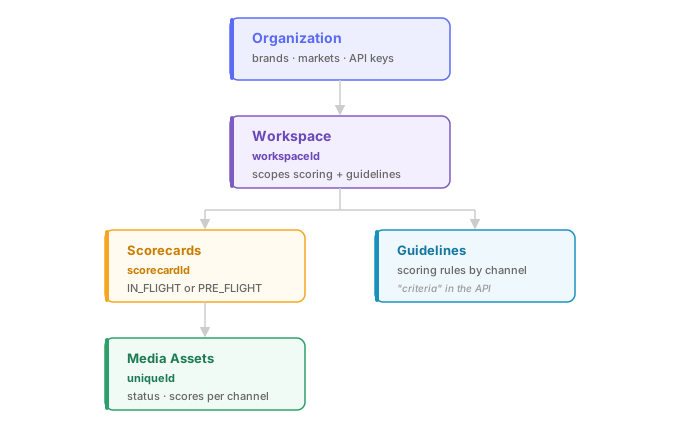
The Vidmob data model is structured as follows:
Organization
└── Workspace (one or more)
    ├── Scorecards
    ├── Guidelines
    └── Media Assets
Your Organization is the umbrella that holds all Workspaces. It also anchors your API credentials: every API key is issued at the Organization level, which means a single key can access all Workspaces belonging to that Organization.
What Lives at the Organization Level
| Concept | Description |
|---|---|
| Workspaces | Logical subdivisions of your Organization (e.g. by brand, region, or team) |
| API Keys | Authentication credentials scoped to the entire Organization |
| Brands and Markets | Top-level taxonomy used to group and filter Workspaces |
Most API operations — scoring, scorecard management, media upload — happen at the Workspace level. But the Organization endpoint gives you a snapshot of everything your credentials have access to, which is useful for discovery and for building integrations that span multiple Workspaces.
Using the Organization Endpoint
Call GET /v1/organization to retrieve the Organization associated with your API key. The response includes the Organization's orgId and a list of all Workspaces you have access to.
You will reference workspaceId values from this response frequently — they are required parameters for scorecard lookups, media uploads, and filtering scored content. If you are unsure which Workspace to target, this is the right starting point.
Authentication Context
All requests are authenticated at the Organization level via your API key. There is no concept of a user in the Creative Scoring API — access is governed by which Organization your key belongs to, not by individual user identity.
If your key does not have access to a particular Workspace, operations scoped to that Workspace will return a 403 Forbidden response.
Common Patterns
Discovering your Workspaces
Before making scoring or scorecard requests, call GET /v1/organization to enumerate the Workspaces your key can reach. Cache the workspaceId values you need — they do not change.
Multi-brand setups
Large organizations often maintain separate Workspaces per brand or market. The Organization endpoint lets you list them all in one call, making it straightforward to route requests to the right Workspace without hardcoding IDs.
Access troubleshooting
If a Workspace ID appears in your dashboard but returns a 403 via API, confirm that the API key you are using belongs to the same Organization as that Workspace.