This page will help you get started with CREATIVE SCORING.
The Creative Scoring API lets you submit externally hosted media for analysis against Vidmob's scoring criteria. Scores are tied to specific creative elements — visuals, messaging, pacing, structure — giving you precise data on which elements are driving performance and which aren't.
How it works
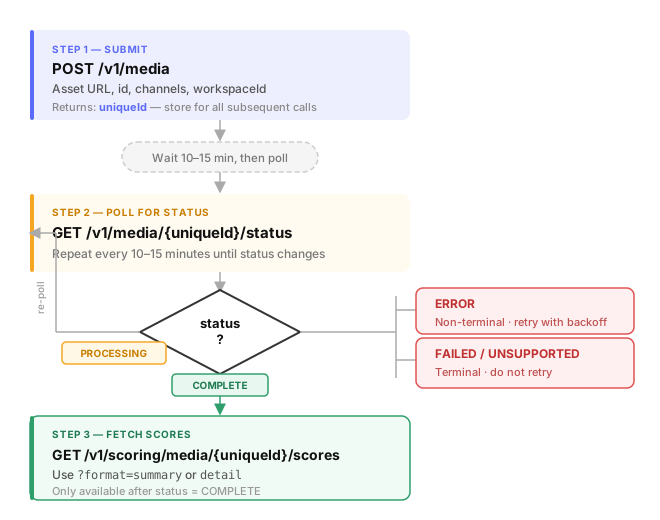
Scoring is asynchronous. Assets go through a multi-stage AI analysis pipeline before results are available. The workflow has three steps:
1. Submit your asset
curl -X POST https://public-api.vidmob.com/v1/media \
  -H "Authorization: Bearer $API_KEY" \
  -H "Content-Type: application/json" \
  -d '{
    "id": "spring-campaign-15s",
    "version": "1.0",
    "url": "https://your-cdn.com/creative.mp4",
    "workspaceId": 45914,
    "channels": ["META", "TIKTOK"]
  }'
You'll receive a uniqueId (UUID) in the response — store it for all subsequent calls.
2. Poll for status
Check GET /v1/media/{uniqueId}/status every 10–15 minutes until the status is COMPLETE:
| Status | Meaning |
|---|---|
PROCESSING | Still in the pipeline. Keep polling. |
COMPLETE | Scoring finished. Results are ready. |
ERROR | Non-terminal error. May resolve on retry. |
UNSUPPORTED | Media format not supported. Terminal. |
FAILED | Processing failed. Terminal. |
3. Fetch scores
Once status is COMPLETE, call GET /v1/scoring/media/{uniqueId}/scores to retrieve the full breakdown by channel and guideline.
Channels
Scores are channel-specific. Specify which platforms to score against at submission time. Supported channel identifiers include META, TIKTOK, ADWORDS, DV360, SNAPCHAT, PINTEREST, and others.
If you omit channels, the API defaults to the channels configured on your workspace's active scorecard.
Workspaces
Including a workspaceId has two effects:
- The asset becomes visible in the Vidmob platform (ACS)
- Workspace-specific scoring guidelines are applied on top of your org-level defaults
Use GET /v1/workspaces to find available workspace IDs. If workspaceId is omitted, only org-global guidelines apply and the asset won't appear in ACS.
Asset deduplication
Vidmob deduplicates on the combination of id + version + source. Resubmitting the same combination returns the existing record rather than creating a new one — no duplicate processing jobs.
If you need to re-score an asset, increment the version field.
URL requirements
The url must be a direct, publicly accessible download link. Redirect chains and auth-gated URLs can cause silent scoring failures. These link types work reliably:
- S3 presigned URLs
- CDN direct links (e.g., Cloudfront, Fastly)
drive.usercontent.google.comdirect links