| Time | Status | User Agent | |
|---|---|---|---|
Retrieving recent requests… | |||
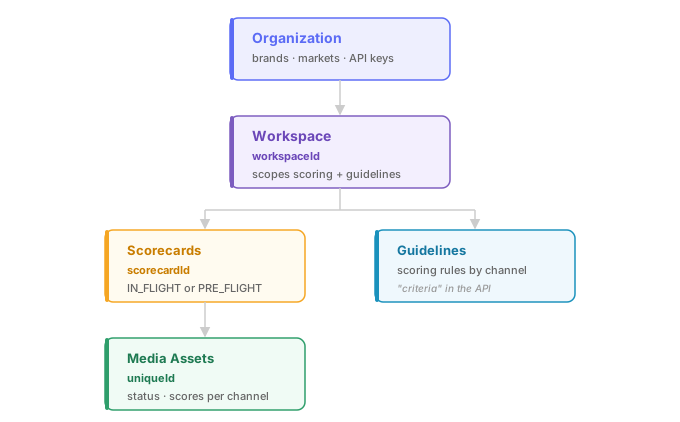
Workspaces are the primary operational unit in Vidmob. Each workspace has its own set of scorecards, scoring guidelines, brands, and markets. When you submit media for scoring, the workspaceId you provide controls which guidelines apply and whether the asset appears in the Vidmob platform UI (ACS).
What's returned
A list of workspaces your API key has access to, including their IDs, names, and associated metadata. The id field from each workspace is the value you pass as workspaceId in scoring and scorecard calls.
When to use this
The most common use case is a one-time lookup to find the numeric workspace IDs you need for other API calls:
curl -H "Authorization: Bearer $API_KEY" \
  https://public-api.vidmob.com/v1/workspaces
Store the returned IDs in your integration's configuration so you can reference them when submitting media or listing scorecards.
How workspaces affect scoring
When you submit media with a workspaceId:
- Workspace-specific scoring guidelines are applied on top of your org-level defaults
- The asset becomes visible in the Vidmob platform (ACS) for that workspace's users
If you omit workspaceId at submission time, only org-global guidelines apply and the asset won't be visible in ACS.