get
https://public-api.vidmob.com/v1/media//status
Provides a way to check media scoring status.
Recent Requests
Log in to see full request history
| Time | Status | User Agent | |
|---|---|---|---|
Retrieving recent requests… | |||
Loading…
Polls the processing status of a submitted media asset. Once status is COMPLETE, scores are available via GET /v1/scoring/media/{mediaId}/scores.
Status values
| Status | Meaning | What to do |
|---|---|---|
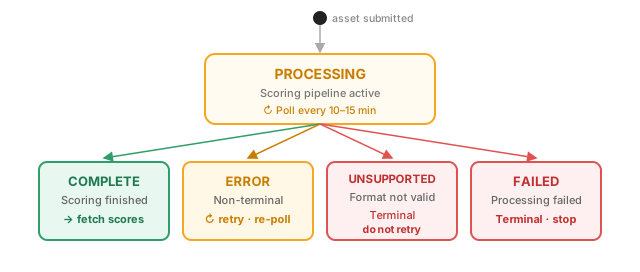
PROCESSING | Asset is being ingested or scored. | Continue polling. |
COMPLETE | Scoring finished. | Fetch scores. |
ERROR | A non-terminal error occurred. | Retry after a backoff interval. |
UNSUPPORTED | Media format or type is not supported. | Terminal — do not retry. |
FAILED | Processing failed. | Terminal — do not retry. |
Polling guidance
Poll every 10–15 minutes. Scoring is a multi-stage AI pipeline — polling more frequently does not speed it up and risks hitting rate limits.
Two ways to look up an asset
By Vidmob uniqueId (recommended):
curl -H "Authorization: Bearer $API_KEY" \
  https://public-api.vidmob.com/v1/media/8576725c-dc61-42c6-bf56-3898ea2523cf/status
By your client-side id (requires source and version query params):
curl -H "Authorization: Bearer $API_KEY" \
  "https://public-api.vidmob.com/v1/media/spring-15s-v1/status?source=acme-dam&version=1.0"
Use one or the other — not both. If you have the uniqueId from the original submission response, use that.